refreshes every 1s · reads AppleSMC directlyrafraîchi toutes les secondes · lit AppleSMC directement每 1 秒更新 · 直接讀取 AppleSMC
The instrument panel macOS forgot to ship.La planche de bord que macOS a oublié de livrer.macOS 忘了附上的那塊儀表板。
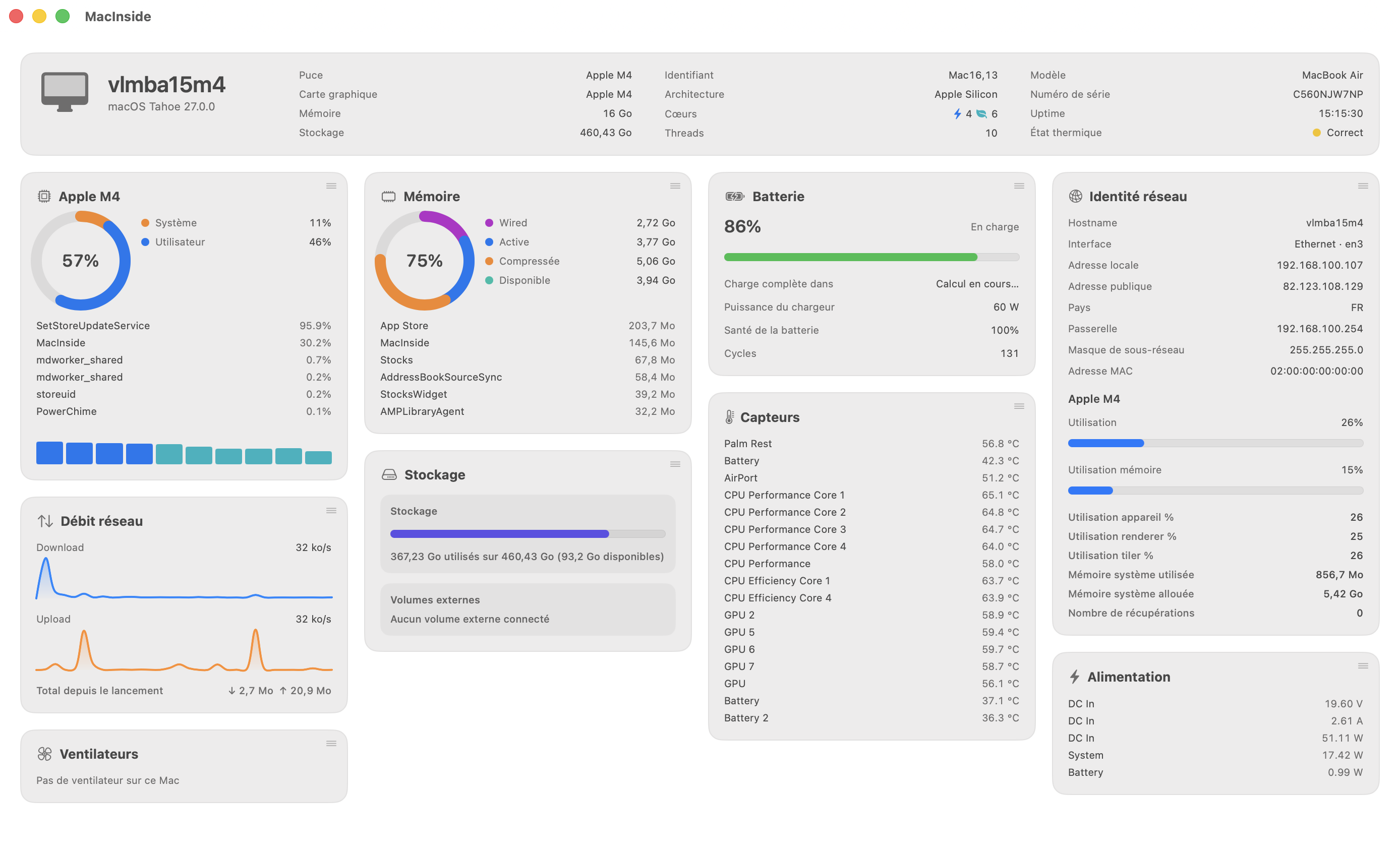
CPU load, real sensor temperatures, fan RPM, GPU utilization, battery health, network throughput — one native dashboard, from the Dock to the menu bar.Charge CPU, températures réelles des capteurs, RPM des ventilateurs, utilisation GPU, santé de la batterie, débit réseau — un tableau de bord natif, du Dock à la barre de menus.CPU 負載、真實感測器溫度、風扇轉速、GPU 使用率、電池健康度、網路流量——一個原生儀表板,從 Dock 到選單列。
Activity Monitor shows you processes. System Settings shows battery health. Neither shows a fan speed or an SMC temperature.Le Moniteur d'activité montre les processus. Les Réglages Système montrent la santé de la batterie. Ni l'un ni l'autre ne montre une vitesse de ventilateur ou une température SMC.活動監視器給你行程,系統設定給你電池健康度。兩者都不會告訴你風扇轉速或 SMC 溫度。
MacInside talks straight to host_statistics, IOKit's AppleSMC, IOAccelerator and libproc — the same low-level APIs tools like iStat Menus and Stats use. No shelling out to top or iostat, no background daemon, no phoning home.MacInside s'adresse directement à host_statistics, à l'AppleSMC d'IOKit, à IOAccelerator et à libproc — les mêmes API bas niveau qu'utilisent iStat Menus ou Stats. Aucun appel à top ou iostat, aucun démon en arrière-plan, aucune remontée de données.MacInside 直接與 host_statistics、IOKit 的 AppleSMC、IOAccelerator 與 libproc 溝通——就是 iStat Menus、Stats 這類工具所用的同一批低階 API。不呼叫 top 或 iostat,沒有背景常駐程式,也不回傳任何資料。
Every reading lands in a single masonry dashboard window, and in a menu bar you shape yourself — one combined dropdown, or six independent icons, each with its own detail view.Chaque relevé arrive dans une seule fenêtre en maçonnerie, et dans une barre de menus que vous façonnez — un menu combiné, ou six icônes indépendantes, chacune avec sa vue détaillée.每一項讀數都落在同一個磚砌式儀表板視窗中,以及一條你自己決定形狀的選單列——一個合併下拉選單,或六個各自獨立、各有詳細檢視的圖示。
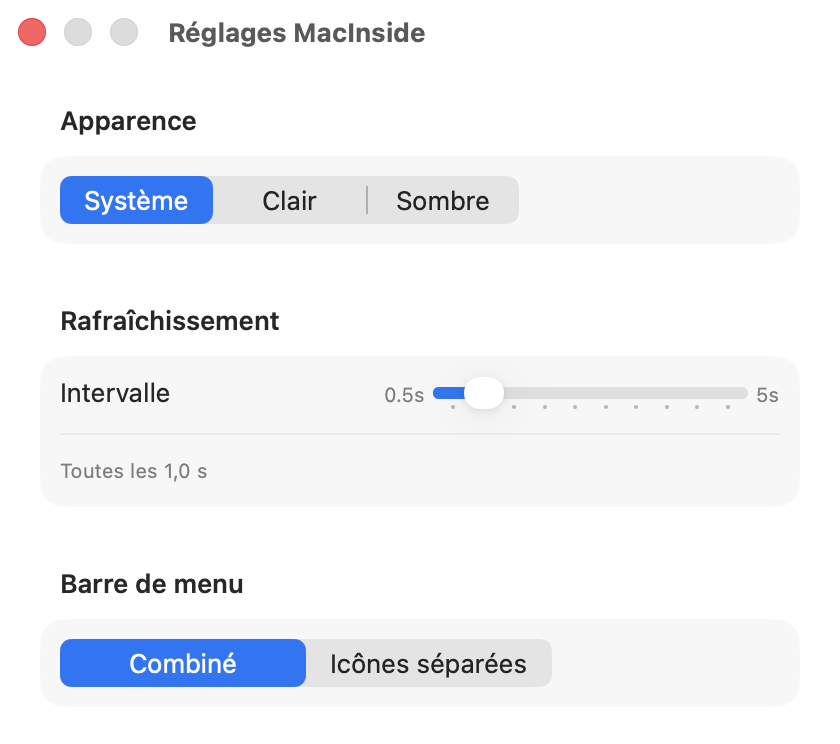
Refresh intervalIntervalle de rafraîchissement更新間隔0.5s – 5s, adjustable0,5 s – 5 s, réglable0.5 秒 – 5 秒,可調整
Data sourceSource des données資料來源IOKit / host_statistics / libproc
Network callsAppels réseau網路連線none, except optional public-IP lookupaucun, hormis la recherche optionnelle d'IP publique無,除了選用的公用 IP 查詢
SandboxSandbox沙箱disabled (SMC + process access)désactivé (accès SMC et processus)已停用(需存取 SMC 與行程)
LicenseLicence授權MIT, source on GitHubMIT, code sur GitHubMIT,原始碼在 GitHub
What it readsCe qu'il lit它讀些什麼
Ten cards, one machine.Dix cartes, une machine.十張卡片,一台機器。
host_processor_info
CPU
System vs. user load, per-core performance/efficiency bars, and the process actually spending your cycles.Charge système contre charge utilisateur, barres performance/efficacité par cœur, et le processus qui consomme réellement vos cycles.系統與使用者負載的對比、每個效能/節能核心的長條圖,以及真正在消耗你運算週期的行程。
vm_statistics64
MemoryMémoire記憶體
Wired, active, compressed, available — plus the top memory consumer, updated every second.Résidente, active, compressée, disponible — plus le plus gros consommateur, mis à jour chaque seconde.常駐、使用中、已壓縮、可用——外加最耗記憶體的行程,每秒更新。
FileManager / statfs
StorageStockage儲存空間
System volume and every external volume, used and free, at a glance.Volume système et chaque volume externe, utilisé et libre, d'un coup d'œil.系統卷宗與每個外接卷宗的已用與可用空間,一眼看完。
getifaddrs
NetworkRéseau網路
Local and public IP, gateway, subnet, MAC address, and live download/upload sparklines.IP locale et publique, passerelle, sous-réseau, adresse MAC, et sparklines de débit en direct.本機與公用 IP、閘道、子網路、MAC 位址,以及即時上下行走勢圖。
IOKit · AppleSMC
SensorsCapteurs感測器
Real SMC temperature & fan readings — Intel and Apple Silicon — with an honest "no fan on this Mac" for fanless models.Relevés SMC réels de température et de ventilateurs — Intel et Apple Silicon — avec un honnête « pas de ventilateur sur ce Mac » pour les modèles fanless.真實的 SMC 溫度與風扇讀數——Intel 與 Apple Silicon 皆支援——無風扇機型則老實顯示「這台 Mac 沒有風扇」。
IOKit · AppleSMC
PowerAlimentation電力
Voltage, current and wattage on DC In, system and battery rails, where the hardware exposes them.Tension, courant et puissance sur les rails DC In, système et batterie, là où le matériel les expose.在硬體有提供的情況下,顯示 DC In、系統與電池電路的電壓、電流與瓦數。
IOAccelerator
GPU
Device, renderer and tiler utilization straight from IOAccelerator — no Console.app required.Utilisation device, renderer et tiler directement depuis IOAccelerator — sans passer par Console.app.直接從 IOAccelerator 取得 device、renderer 與 tiler 的使用率——不需要開 Console.app。
IOPowerSources
BatteryBatterie電池
Charge, time remaining, health and cycle count — hidden automatically if your Mac doesn't have one.Charge, autonomie restante, santé et nombre de cycles — masqué automatiquement si votre Mac n'en a pas.電量、剩餘時間、健康度與循環次數——若你的 Mac 沒有電池則自動隱藏。
libproc · KERN_PROCARGS2
ProcessesProcessus行程
A full process manager: sortable table, regex search, numeric filters, pinning, per-process disk I/O, parent/child navigation — and Terminate / Force Quit / Lower priority.Un vrai gestionnaire de processus : table triable, recherche regex, filtres numériques, épinglage, E/S disque par processus, navigation parent/enfants — et Terminer / Forcer l'arrêt / Baisser la priorité.完整的行程管理器:可排序表格、regex 搜尋、數值篩選、釘選、每個行程的磁碟 I/O、父子行程導覽——還能結束、強制結束或調降優先權。
WidgetKit
WidgetsWidgets小工具
Ten native macOS widgets — Notification Center and desktop — mirroring every dashboard card, timestamped so you always know how fresh the data is.Dix widgets macOS natifs — Centre de notifications et bureau — reflétant chaque carte du dashboard, horodatés pour toujours connaître la fraîcheur de la donnée.十個原生 macOS 小工具——通知中心與桌面——對應儀表板的每張卡片,並附時間戳記,隨時知道資料有多新。
The dashboardLe tableau de bord儀表板
Every card, one window, no scrolling to find what broke.Toutes les cartes, une fenêtre, sans faire défiler pour trouver ce qui cloche.所有卡片集中在一個視窗,不必捲動就能找到出問題的地方。
A masonry layout that adapts to your window width — drag any card to reorder it, the layout is remembered next time you launch.Une mise en page en maçonnerie qui s'adapte à la largeur de la fenêtre — glissez une carte pour la réordonner, la disposition est retenue au prochain lancement.磚砌式版面會依視窗寬度自動調整——拖曳任一張卡片即可重新排序,下次啟動時會記住這個版面。
Menu barBarre de menus選單列
Lives in your menu bar, however much room you give it.Vit dans votre barre de menus, quelle que soit la place que vous lui laissez.住在你的選單列裡,不管你留給它多少空間。
One combined dropdown for a quick glance, or six independent icons — CPU, Memory, Network, Disk, Battery, GPU — each opening its own detailed view. Toggle per metric from Settings.Un menu combiné pour un coup d'œil rapide, ou six icônes indépendantes — CPU, Mémoire, Réseau, Disque, Batterie, GPU — chacune ouvrant sa vue détaillée. Activable métrique par métrique dans les Réglages.想快速一瞥就用一個合併下拉選單,或改用六個獨立圖示——CPU、記憶體、網路、磁碟、電池、GPU——每個都能開啟自己的詳細檢視。可在設定中逐項開關。
CPU 34%MEM 71%NET ↓52MB/sDISK 79%BATT 86%GPU 12%
Under the hoodSous le capot底層架構
Built the way a system tool should be.Construit comme un outil système devrait l'être.以系統工具該有的方式打造。
✓Signed & notarized. Developer ID + Hardened Runtime, stapled by Apple — launches without a Gatekeeper warning, even offline.Signée et notariée. Developer ID + Hardened Runtime, stapled par Apple — se lance sans avertissement Gatekeeper, même hors ligne.已簽章與公證。Developer ID + Hardened Runtime,並由 Apple 裝訂——即使離線也不會出現 Gatekeeper 警告。
✓Self-updating. Sparkle checks in the background and asks before it ever downloads or installs anything.Auto-mise à jour. Sparkle vérifie en arrière-plan et demande toujours avant de télécharger ou d'installer quoi que ce soit.自動更新。Sparkle 會在背景檢查,並且在下載或安裝任何東西之前都會先詢問你。
✓Speaks your language. Follows the system language automatically — French or English today.Parle votre langue. Suit automatiquement la langue du système — français ou anglais aujourd'hui.說你的語言。自動跟隨系統語言——目前支援法文與英文。
✓Open source. MIT licensed — read every line, or build it yourself with XcodeGen.Open source. Sous licence MIT — lisez chaque ligne, ou compilez-la vous-même avec XcodeGen.開源。採 MIT 授權——你可以讀每一行程式碼,也可以自己用 XcodeGen 建置。