
What it doesCe qu'il fait功能
A Classify button on the reading ribbonUn bouton Classify sur le ruban de lecture閱讀功能區上的 Classify 按鈕
Open a message, choose Classify in the MailClassification group, and a pane opens beside it with two cards. Ouvrez un message, choisissez Classify dans le groupe MailClassification : un volet s'ouvre à côté, avec deux cartes. 開啟一封郵件,在 MailClassification 群組中選擇 Classify,旁邊就會開啟一個含兩張卡片的窗格。
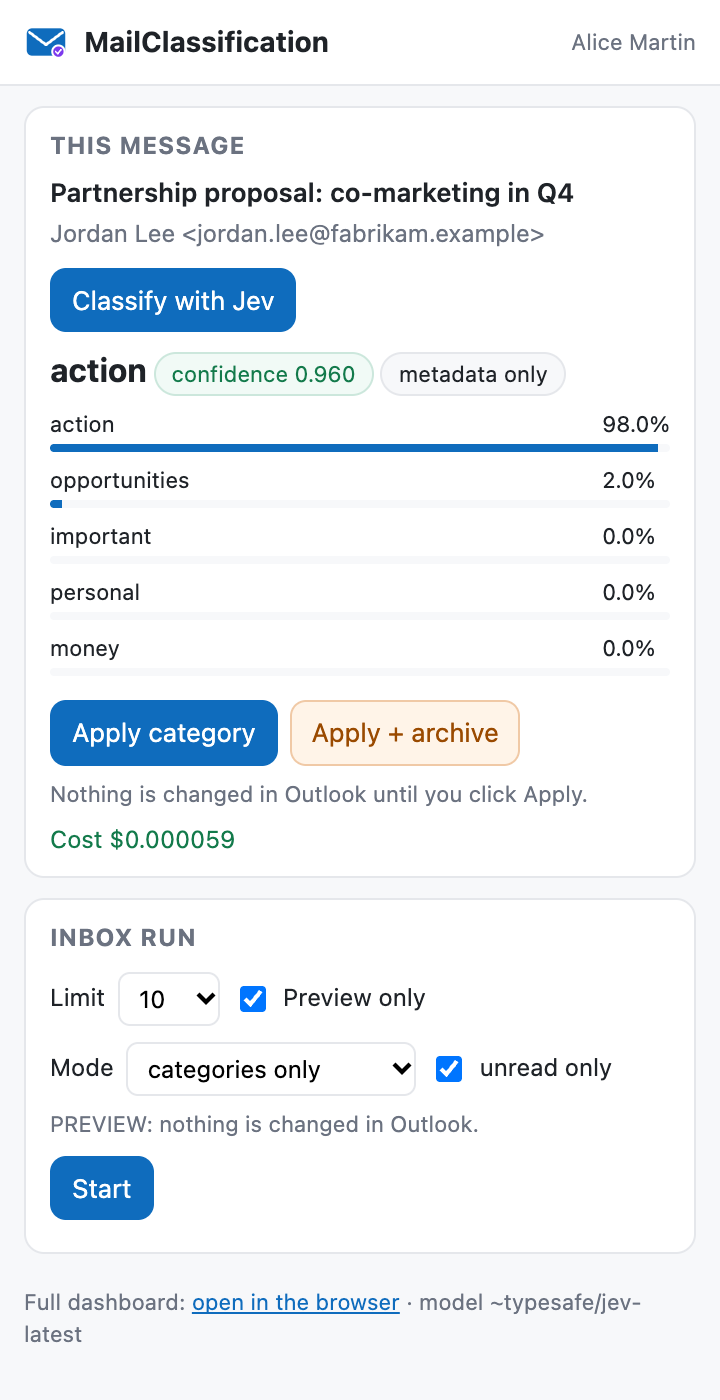
This messageCe message這封郵件
Classify with Jev shows the label, its confidence, whether the headers were enough or the text was read, the top five probabilities and the cost. Apply category adds it to the message — existing categories are kept. Apply + archive appears only for archive-eligible categories at a confidence of at least 0.93, as in a batch run. Nothing changes until you click Apply.Classify with Jev affiche le libellé, sa confiance, si les en-têtes ont suffi ou si le texte a été lu, les cinq meilleures probabilités et le coût. Apply category l'ajoute au message — les catégories existantes sont conservées. Apply + archive n'apparaît que pour les catégories éligibles à l'archivage, avec une confiance d'au moins 0,93, comme pour un traitement par lot. Rien ne change avant Apply.Classify with Jev 會顯示標籤、信心值、是只靠標頭還是讀了內文、前五名機率與費用。Apply category 把類別加到郵件上——既有類別保留。Apply + archive 只在可封存的類別且信心值至少 0.93 時出現,與批次處理相同。按下 Apply 之前不會改變任何東西。
Inbox runTraitement de la boîte收件匣批次處理
The dashboard's batch run, from Outlook: 10, 50, 100 or all messages, preview only by default, categories or categories + archive (confirmed before a live archive run), unread only. Fixed in the pane: $0.10 budget, 0.75 / 0.93 thresholds, Inbox. A live list of the last 12 results and a Stop button.Le traitement par lots du tableau de bord, depuis Outlook : 10, 50, 100 messages ou tous, aperçu seul par défaut, catégories ou catégories + archivage (confirmé avant un run réel avec archivage), non lus seulement. Fixés dans le volet : budget 0,10 $, seuils 0,75 / 0,93, boîte de réception. Une liste en direct des 12 derniers résultats et un bouton Stop.把儀表板的批次處理搬進 Outlook:10、50、100 封或全部,預設僅預覽,只加類別或加類別並封存(實際封存前會要求確認),僅未讀。窗格中固定:預算 0.10 美元、門檻 0.75 / 0.93、收件匣。即時顯示最近 12 筆結果,並有 Stop 按鈕。
The full dashboard, one click awayLe tableau de bord complet, à un clic完整儀表板,一鍵開啟
The footer links to the local dashboard for everything the pane keeps fixed — thresholds, budget, rules, other mailboxes — and names the model in use. The header shows the signed-in mailbox.Le pied du volet renvoie au tableau de bord local pour tout ce que le volet fige — seuils, budget, règles, autres boîtes — et indique le modèle utilisé. L'en-tête affiche la boîte connectée.窗格底部連到本機儀表板,處理窗格中固定的一切——門檻、預算、規則、其他信箱——並顯示使用中的模型。頂端顯示已登入的信箱。
How it worksFonctionnement運作方式
The pane lives on your computer, not in a cloudLe volet vit sur votre ordinateur, pas dans un cloud窗格在你的電腦上,不在雲端
https://localhost:5178Highlighted: what runs on your computer.En surbrillance : ce qui tourne sur votre ordinateur.醒目標示:在你電腦上執行的部分。
- Served by your own server.
mailclassification uiserves the dashboard onhttp://127.0.0.1:5177and the pane onhttps://localhost:5178, with the ASP.NET Core development certificate. If it is not running, Outlook has nothing to load.Servi par votre propre serveur.mailclassification uisert le tableau de bord surhttp://127.0.0.1:5177et le volet surhttps://localhost:5178, avec le certificat de développement ASP.NET Core. S'il ne tourne pas, Outlook n'a rien à charger.由你自己的伺服器提供。mailclassification ui在http://127.0.0.1:5177提供儀表板,並以 ASP.NET Core 開發憑證在https://localhost:5178提供窗格。它沒在執行時,Outlook 就沒有東西可載入。 - No sign-in of its own. The add-in reuses MailClassification's Microsoft 365 sign-in and stored key, with the first signed-in Microsoft 365 mailbox. The message is found with
convertToRestId, then read through Microsoft Graph.Aucune connexion propre. Le complément réutilise la connexion Microsoft 365 et la clé enregistrée de MailClassification, avec la première boîte Microsoft 365 connectée. Le message est retrouvé viaconvertToRestId, puis lu par Microsoft Graph.本身不需登入。增益集沿用 MailClassification 的 Microsoft 365 登入與已儲存的金鑰,使用第一個已登入的 Microsoft 365 信箱。郵件先以convertToRestId定位,再透過 Microsoft Graph 讀取。 - Locked to your machine. Loopback only; any other Host header gets 421; the API answers same-origin JSON POST requests only. Email content is shown as text, never as HTML.Verrouillé sur votre machine. Boucle locale seulement ; tout autre en-tête Host reçoit 421 ; l'API ne répond qu'aux requêtes POST JSON de même origine. Le contenu des e-mails est affiché comme texte, jamais comme HTML.鎖定在你的電腦上。只監聽本機回送位址;其他 Host 標頭一律回 421;API 只接受同源的 JSON POST 請求。郵件內容以純文字顯示,絕不當成 HTML。
RequirementsPrérequis需求
What you need before you startCe qu'il faut avant de commencer開始前需要準備的東西
- A Microsoft 365 or Outlook.com mailbox. Gmail and IMAP mailboxes work in the dashboard and CLI, not in the add-in.Une boîte Microsoft 365 ou Outlook.com. Les boîtes Gmail et IMAP fonctionnent dans le tableau de bord et la CLI, pas dans le complément.一個 Microsoft 365 或 Outlook.com 信箱。Gmail 與 IMAP 信箱可在儀表板與命令列使用,但不支援增益集。
- The .NET 10 SDK, an Entra app registration, an OpenRouter key and a trusted development certificate — all covered in the install steps below.Le SDK .NET 10, une inscription d'application Entra, une clé OpenRouter et un certificat de développement approuvé — tout est couvert dans les étapes ci-dessous..NET 10 SDK、Entra 應用程式註冊、OpenRouter 金鑰,以及受信任的開發憑證——下方安裝步驟都會說明。
- An organisation that allows custom add-ins. Many companies disable them; only a tenant administrator can change that.Une organisation qui autorise les compléments personnalisés. Beaucoup d'entreprises les désactivent ; seul un administrateur du tenant peut changer cela.允許自訂增益集的組織。許多公司會停用自訂增益集;只有租用戶管理員能變更。
- Outlook on the same computer as the server: Outlook on the web, new Outlook for Windows, Outlook for Mac or classic Outlook for Windows. The manifest targets Mailbox requirement set 1.1, with the ribbon button at 1.3. Only the pane itself has been checked, in a browser; no mobile clients.Outlook sur le même ordinateur que le serveur : Outlook sur le web, le nouvel Outlook pour Windows, Outlook pour Mac ou Outlook classique pour Windows. Le manifeste vise l'ensemble de conditions Mailbox 1.1, avec le bouton du ruban en 1.3. Seul le volet lui-même a été vérifié, dans un navigateur ; pas de clients mobiles.與伺服器在同一台電腦上的 Outlook:網頁版 Outlook、新版 Windows 版 Outlook、Mac 版 Outlook 或傳統 Windows 版 Outlook。資訊清單要求 Mailbox 需求集 1.1,功能區按鈕為 1.3。目前只在瀏覽器中實際檢查過窗格本身;不支援行動版。
InstallInstaller安裝
Seven steps to a working paneSept étapes jusqu'au volet七個步驟完成安裝
macOS / Linux syntax. On Windows PowerShell, use $HOME\.mailclassification\bin for ~/.mailclassification/bin.Syntaxe macOS / Linux. Sous Windows PowerShell, utilisez $HOME\.mailclassification\bin à la place de ~/.mailclassification/bin.以下為 macOS / Linux 語法。在 Windows PowerShell 中,請把 ~/.mailclassification/bin 換成 $HOME\.mailclassification\bin。
-
Build and publishCompiler et publier建置並發佈
A stable copy in
~/.mailclassification/bin; put it on yourPATH.Une copie stable dans~/.mailclassification/bin; ajoutez-la à votrePATH.在~/.mailclassification/bin產生穩定的副本,並加入PATH。git clone https://github.com/vincentlauriat/MailClassification.jev.git cd MailClassification.jev dotnet publish src/MailClassification -c Release -o ~/.mailclassification/bin -
Store the OpenRouter keyEnregistrer la clé OpenRouter儲存 OpenRouter 金鑰
Store it even if your shell exports it: the background service does not see shell variables.Enregistrez-la même si votre shell l'exporte : le service d'arrière-plan ne voit pas les variables du shell.即使 shell 已經匯出也要儲存:背景服務看不到 shell 的環境變數。
mailclassification key set sk-or-... mailclassification key test -
Connect the Microsoft 365 mailboxConnecter la boîte Microsoft 365連接 Microsoft 365 信箱
After the one-time Entra app registration; then type the device code that is printed.Après l'inscription Entra unique ; saisissez ensuite le code affiché.先完成一次性的 Entra 應用程式註冊,再輸入畫面上顯示的裝置代碼。
mailclassification config set client-id <application-client-id> mailclassification account add alice@contoso.com --m365 -
Trust the development certificateApprouver le certificat de développement信任開發憑證
Once per computer. Outlook only loads add-in pages over HTTPS.Une fois par ordinateur. Outlook ne charge les pages de complément qu'en HTTPS.每台電腦一次。Outlook 只透過 HTTPS 載入增益集頁面。
dotnet dev-certs https --trust -
Keep the server runningGarder le serveur en marche讓伺服器持續執行
macOS: a LaunchAgent starts it at login;
service statusshould reportHealth : MailClassification … answers. Windows / Linux: noservicecommand yet — runmailclassification ui --no-openand keep it running, for example as a scheduled task at logon.macOS : un LaunchAgent le lance à l'ouverture de session ;service statusdoit afficherHealth : MailClassification … answers. Windows / Linux : pas encore de commandeservice— lancezmailclassification ui --no-openet gardez-le en marche, par exemple via une tâche planifiée à l'ouverture de session.macOS:由 LaunchAgent 在登入時啟動;service status應顯示Health : MailClassification … answers。Windows / Linux:目前還沒有service指令——請執行mailclassification ui --no-open並保持執行,例如設成登入時的排程工作。mailclassification service install --exe ~/.mailclassification/bin/mailclassification mailclassification service status -
Check the pane in a browserVérifier le volet dans un navigateur在瀏覽器中檢查窗格
Open https://localhost:5178/taskpane.html. It must load with no certificate warning and show your mailbox in its header.Ouvrez https://localhost:5178/taskpane.html. La page doit se charger sans avertissement de certificat et afficher votre boîte dans son en-tête.開啟 https://localhost:5178/taskpane.html。頁面必須在沒有憑證警告的情況下載入,並在頂端顯示你的信箱。
-
Get the manifestRécupérer le manifeste取得資訊清單
Download https://localhost:5178/manifest.xml, or write it with the CLI (without
--outit goes torelease/mailclassification-manifest.xmlunder the current directory;--https-portif you changed the port).Téléchargez https://localhost:5178/manifest.xml, ou écrivez-le avec la CLI (sans--out, il va dansrelease/mailclassification-manifest.xmlsous le répertoire courant ;--https-portsi vous avez changé le port).下載 https://localhost:5178/manifest.xml,或用命令列產生(沒有--out時會寫到目前目錄下的release/mailclassification-manifest.xml;若改過連接埠請加--https-port)。mailclassification addin manifest --out ~/mailclassification-manifest.xml
SideloadCharger le complément側載
Add it to Outlook from the fileL'ajouter à Outlook depuis le fichier從檔案加入 Outlook
These are the usual paths; Microsoft moves menus from time to time. The reference is Microsoft's guide, Sideload Outlook add-ins for testing.Ce sont les chemins habituels ; Microsoft déplace parfois les menus. La référence est le guide de Microsoft, Sideload Outlook add-ins for testing.以下是常見路徑;Microsoft 不時會移動選單。請以 Microsoft 的官方指南 Sideload Outlook add-ins for testing 為準。
| ClientClient用戶端 | Usual pathChemin habituel常見路徑 |
|---|---|
| Outlook on the web, new OutlookOutlook sur le web, nouvel Outlook網頁版 Outlook、新版 Outlook | Open aka.ms/olksideload → "Add-ins for Outlook" → My add-ins → Custom add-ins → Add a custom add-in → Add from file…Ouvrez aka.ms/olksideload → « Add-ins for Outlook » → My add-ins → Custom add-ins → Add a custom add-in → Add from file… (libellés selon la langue d'Outlook)開啟 aka.ms/olksideload →「Add-ins for Outlook」→ My add-ins → Custom add-ins → Add a custom add-in → Add from file…(實際名稱依 Outlook 語言而定) |
| Outlook for MacOutlook pour MacMac 版 Outlook | Get Add-ins (or under the … menu) → the same My add-ins → Custom add-ins → Add from file…Get Add-ins (ou dans le menu …) → le même My add-ins → Custom add-ins → Add from file…Get Add-ins(或在 … 選單中)→ 同樣的 My add-ins → Custom add-ins → Add from file… |
| Classic Outlook for WindowsOutlook classique pour Windows傳統 Windows 版 Outlook | Home → Get Add-ins (or File → Manage Add-ins) → the same My add-ins → Custom add-ins → Add from file…Accueil → Get Add-ins (ou Fichier → Gérer les compléments) → le même My add-ins → Custom add-ins → Add from file…常用 → Get Add-ins(或 檔案 → 管理增益集)→ 同樣的 My add-ins → Custom add-ins → Add from file… |
~/.mailclassification on their own. Run mailclassification service install once (it replaces the old agent), generate the manifest again and sideload it once more to see the new name; the add-in id is the same. Upgrade notes.
Mise à jour depuis jevOutlook : le complément s'appelait jevOutlook jusqu'au 2026-09-28. Vos réglages passent seuls dans ~/.mailclassification. Lancez une fois mailclassification service install (il remplace l'ancien agent), régénérez le manifeste et rechargez-le pour voir le nouveau nom ; l'id du complément ne change pas. Notes de mise à jour.
從 jevOutlook 升級:此增益集在 2026-09-28 之前名為 jevOutlook。你的設定會自動移到 ~/.mailclassification。請執行一次 mailclassification service install(會取代舊的代理程式),重新產生資訊清單並再次側載,即可看到新名稱;增益集 id 不變。升級說明。
TroubleshootingDépannage疑難排解
The five problems you are most likely to meetLes cinq problèmes les plus probables最可能遇到的五個問題
| SymptomSymptôme症狀 | FixSolution解法 |
|---|---|
| Blank pane / can't reachVolet vide / injoignable窗格空白/無法連線 | The server is not running. mailclassification service status, then service restart; read ~/.mailclassification/logs/ui.log.Le serveur ne tourne pas. mailclassification service status, puis service restart ; lisez ~/.mailclassification/logs/ui.log.伺服器沒有執行。執行 mailclassification service status,再 service restart;查看 ~/.mailclassification/logs/ui.log。 |
| Certificate warningAvertissement de certificat憑證警告 | dotnet dev-certs https --trust, then restart the server. Without a certificate the server falls back to HTTP only and the pane cannot load.dotnet dev-certs https --trust, puis redémarrez le serveur. Sans certificat, le serveur se replie sur HTTP seul et le volet ne peut pas se charger.執行 dotnet dev-certs https --trust,再重新啟動伺服器。沒有憑證時伺服器只會以 HTTP 執行,窗格無法載入。 |
| "Not signed in — use the dashboard"« Not signed in — use the dashboard »「Not signed in — use the dashboard」 | The Microsoft sign-in expired: mailclassification account login <id>.La connexion Microsoft a expiré : mailclassification account login <id>.Microsoft 登入已過期:mailclassification account login <id>。 |
| "· no API key"« · no API key »「· no API key」 | mailclassification key set <key> — the service does not see a key exported only in your shell.mailclassification key set <clé> — le service ne voit pas une clé exportée seulement dans votre shell.mailclassification key set <金鑰>——服務看不到只在 shell 中匯出的金鑰。 |
| "Add-in installation failed"« Add-in installation failed »「Add-in installation failed」 | Custom add-ins are disabled by your organisation's policy. Only a tenant administrator can change it.Les compléments personnalisés sont désactivés par la politique de votre organisation. Seul un administrateur du tenant peut la changer.你的組織政策停用了自訂增益集。只有租用戶管理員能變更。 |
Port conflicts, "Local server unreachable", the Stop button and more: full troubleshooting table.Conflits de port, « Local server unreachable », le bouton Stop et plus : tableau de dépannage complet.連接埠衝突、「Local server unreachable」、Stop 按鈕等更多問題:完整疑難排解表。
StatusÉtat現況