24MeteoStation
Native macOS app mirroring a Bresser Weather Center 7-in-1 consoleApp macOS native reproduisant la console d'une Bresser Weather Center 7-in-1原生 macOS 應用程式,復刻 Bresser Weather Center 7-in-1 控制台
Your weather station, on your Mac. Local. Real-time. No cloud.Votre station météo, sur votre Mac. Local. Temps réel. Sans cloud.您的氣象站,就在 Mac 上。本地、即時、無雲端。
MeteoStation mirrors a Bresser Weather Center 7-in-1 console — the station pushes every reading straight to your Mac every ~5 seconds, over your own WiFi. No account, no cloud, no polling.MeteoStation reproduit la console d'une Bresser Weather Center 7-in-1 — la station pousse chaque mesure directement vers votre Mac toutes les ~5 secondes, via votre propre WiFi. Sans compte, sans cloud, sans polling.MeteoStation 復刻 Bresser Weather Center 7-in-1 控制台——氣象站每約 5 秒透過您自己的 WiFi 將讀數直接推送到 Mac。無帳戶、無雲端、無輪詢。
- RequiresConfiguration系統需求
- macOS 14+
- DistributionDistribution發行
- Developer ID signed & notarized · Sparkle 2 updatesSignée Developer ID & notariée · Mises à jour Sparkle 2Developer ID 簽章並經公證 · Sparkle 2 更新
- LicenceLicence授權
- MITMITMIT
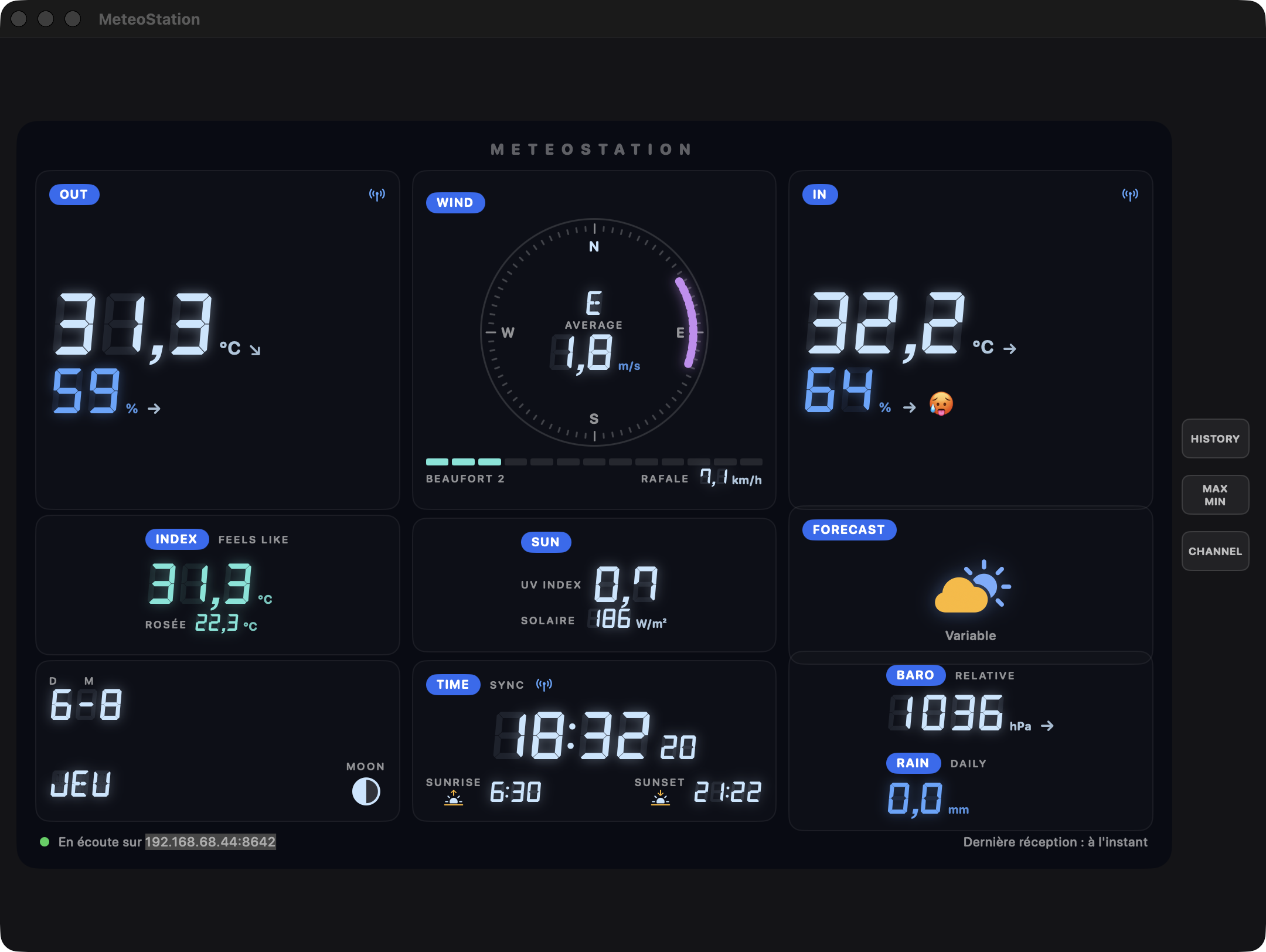
Real-time pushPush temps réel即時推送
The app embeds a tiny HTTP server; the console pushes Weather Underground frames to it every ~5 seconds. The app is the weather server.L'app embarque un mini serveur HTTP ; la console y pousse ses trames Weather Underground toutes les ~5 secondes. L'app est le serveur météo.應用內建微型 HTTP 伺服器;控制台每約 5 秒推送一次 Weather Underground 資料幀。應用本身就是氣象伺服器。
Console-style UIInterface façon console控制台風格介面
True 3×3 layout, DSEG 7-segment digits with ghost segments, wind compass, Beaufort scale, pressure graph, trend arrows, comfort smiley.Grille 3×3 fidèle, chiffres 7 segments DSEG avec segments fantômes, boussole de vent, échelle de Beaufort, graphe de pression, flèches de tendance, smiley de confort.忠實的 3×3 版面、DSEG 七段數碼字體、風向羅盤、蒲福風級、氣壓曲線、趨勢箭頭、舒適度表情。
Every sensorTous les capteurs全部感測器
Outdoor & indoor temperature and humidity, dew point, feels-like, wind, gusts, rain, UV index, solar radiation, relative pressure.Températures et humidités extérieure/intérieure, point de rosée, ressenti, vent, rafales, pluie, indice UV, rayonnement solaire, pression relative.室外/室內溫濕度、露點、體感溫度、風速、陣風、降雨、UV 指數、太陽輻射、相對氣壓。
Sun & moonSoleil & lune日月資訊
Sunrise/sunset computed locally (NOAA algorithm), moon phase, clock with seconds — no network lookup needed.Lever/coucher du soleil calculés localement (algorithme NOAA), phase de lune, horloge avec secondes — aucun accès réseau nécessaire.本地計算日出日落(NOAA 演算法)、月相、帶秒時鐘——無需連網查詢。
Private by designPrivé par conception隱私優先
Everything stays on your LAN. Sandboxed app, 7-day local history, no account, no analytics, open source.Tout reste sur votre réseau local. App sandboxée, historique local de 7 jours, pas de compte, zéro télémétrie, open source.一切資料保留在區域網路內。沙盒應用、7 天本地歷史、無帳戶、無遙測、開源。
One-click updatesMises à jour en un clic一鍵更新
Sparkle 2 + notarized DMGs + EdDSA signatures — Check for Updates… downloads, swaps and relaunches.Sparkle 2 + DMG notariés + signatures EdDSA — Rechercher les mises à jour… télécharge, remplace et relance.Sparkle 2 + 已公證 DMG + EdDSA 簽章——檢查更新即可下載、替換並重新啟動。
Installed in minutesInstallée en quelques minutes幾分鐘完成安裝
Download. Grab the latest signed .dmg from GitHub Releases and drop MeteoStation into /Applications.Télécharger. Récupérez le dernier .dmg signé depuis GitHub Releases et déposez MeteoStation dans /Applications.下載。從 GitHub Releases 取得最新簽章的 .dmg,並將 MeteoStation 拖入 /Applications。
Launch. The status bar shows the exact address your station must push to, e.g. 192.168.1.50:8642.Lancer. La barre de statut affiche l'adresse exacte vers laquelle la station doit pousser, ex. 192.168.1.50:8642.啟動。狀態列會顯示氣象站需要推送到的確切位址,如 192.168.1.50:8642。
Configure the console. Put the console in AP mode, open its web UI and enter that address in the free-URL weather service. Full guide in the repo.Configurer la console. Passez la console en mode AP, ouvrez son interface web et saisissez cette adresse dans le service météo à URL libre. Guide complet dans le repo.設定控制台。將控制台切換到 AP 模式,開啟其網頁介面,在自訂 URL 氣象服務中輸入該位址。完整指南見儲存庫。
CompatibilityCompatibilité相容性
Unofficial project — not affiliated with Bresser. Works with the Bresser Weather Center 7-in-1 (WSX3001-generation console, the one with the built-in AP-mode web UI). Your station, your LAN, your data.Projet non officiel — sans affiliation avec Bresser. Fonctionne avec la Bresser Weather Center 7-in-1 (console génération WSX3001, celle qui a l'interface web en mode AP). Votre station, votre réseau, vos données.非官方專案——與 Bresser 無關。適用於 Bresser Weather Center 7-in-1(WSX3001 世代控制台,即帶 AP 模式網頁介面的版本)。您的氣象站、您的網路、您的資料。