FeaturesFonctionnalités功能
Everything you expect from a modern Sudoku, and one thing you don't.Tout ce qu'on attend d'un Sudoku moderne, et une chose qu'on n'attend pas.現代數獨該有的一切,再加上一個你意想不到的功能。
Native SwiftUI Sudoku for macOSSudoku natif SwiftUI pour macOS原生 SwiftUI macOS 數獨
A Sudoku that plays all by itself, cell by cell, like a human would.Un Sudoku qui joue tout seul, case par case, comme le ferait un humain.一款會自己下棋的數獨,一格一格地解,就像真人一樣。
A native SwiftUI Sudoku with four difficulty levels — and a mode where the app plays all by itself.Un Sudoku natif SwiftUI avec quatre niveaux de difficulté — et un mode où l'app joue toute seule.原生 SwiftUI 數獨,提供四種難度——還有一個讓 App 完全自己玩的模式。
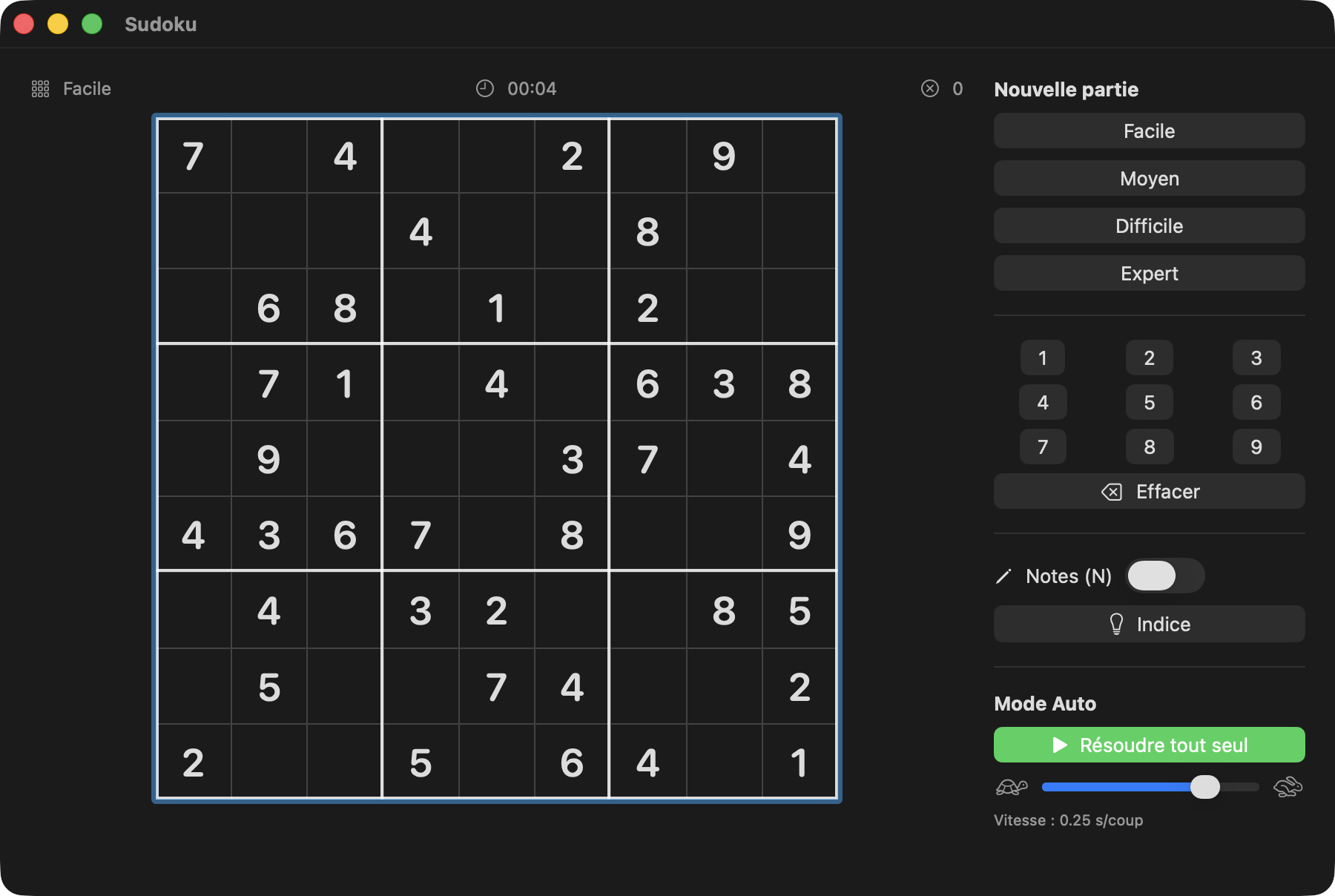
Everything you expect from a modern Sudoku, and one thing you don't.Tout ce qu'on attend d'un Sudoku moderne, et une chose qu'on n'attend pas.現代數獨該有的一切,再加上一個你意想不到的功能。
Easy, Medium, Hard, Expert — from 40 down to 24 clues. Every puzzle is generated fresh and verified to have exactly one solution.Facile, Moyen, Difficile, Expert — de 40 à 24 indices. Chaque grille est générée à neuf et vérifiée pour n'avoir qu'une seule solution.簡單、中等、困難、專家——提示從 40 個減到 24 個。每道題目都是全新生成,並經驗證只有唯一解。
Press play and watch the app solve the board itself at up to 20 moves per second, correcting your mistakes along the way. Pause and resume anytime.Appuyez sur lecture et regardez l'app résoudre la grille elle-même, jusqu'à 20 coups par seconde, en corrigeant vos erreurs au passage. Pause et reprise à tout moment.按下播放,看 App 以每秒最多 20 步的速度自己解開盤面,順便修正你的錯誤。隨時可以暫停與繼續。
Digits 1–9, arrow keys, Delete, N for pencil marks. Or play entirely with the mouse and the number pad.Chiffres 1–9, flèches, Suppr, N pour les annotations. Ou jouez entièrement à la souris avec le pavé numérique.數字 1–9、方向鍵、Delete,按 N 切換筆記。也可以完全用滑鼠與數字面板來玩。
Row, column and box peers, same-value cells, and conflicts in red — the scanning aids you expect from a modern Sudoku.Ligne, colonne et bloc associés, cases de même valeur, conflits en rouge — les aides au repérage qu'on attend d'un Sudoku moderne.同列、同行、同宮的格子、相同數字的格子,以及以紅色標示的衝突——現代數獨該有的掃視輔助。
Toggleable notes mode; notes are automatically cleaned up as the surrounding cells get solved.Mode notes activable ; les notes sont nettoyées automatiquement à mesure que les cases voisines sont résolues.可切換的筆記模式;周圍格子解開後,筆記會自動清除。
A hint button that fills the selected cell, a timer, and an error counter that flags wrong digits in red instantly.Un bouton d'indice qui remplit la case sélectionnée, un chronomètre et un compteur d'erreurs qui signale aussitôt les mauvais chiffres en rouge.一個會填入所選格子的提示按鈕、一個計時器,以及會立即以紅色標出錯誤數字的錯誤計數。
The solution is known before you play. The generator builds a complete valid grid with randomized backtracking, then digs holes one by one — keeping each hole only if a counting solver proves the puzzle still has exactly one solution.La solution est connue avant de jouer. Le générateur construit une grille complète et valide par backtracking aléatoire, puis creuse les cases une à une — chaque trou n'est gardé que si un solveur de comptage prouve que la grille a toujours une seule solution.開局前就已知道解答。產生器以隨機回溯法建立一個完整有效的盤面,再逐格挖空——只有在計數解題器證明題目仍只有唯一解時,才保留那個空格。
Moves are chosen like a human would. Auto-play repeatedly picks the empty cell with the fewest remaining candidates (the MRV heuristic — “find the cell where only one digit fits”), producing an organic cascade instead of a mechanical left-to-right sweep. Your wrong entries get corrected first.Les coups sont choisis comme le ferait un humain. La lecture automatique choisit à chaque fois la case vide qui a le moins de candidats restants (l'heuristique MRV — « trouver la case où un seul chiffre convient »), ce qui produit une cascade organique plutôt qu'un balayage mécanique de gauche à droite. Vos erreurs sont corrigées en premier.每一步都像真人一樣選擇。自動遊玩會反覆挑選剩餘候選數最少的空格(MRV 啟發法——「找出只能填一個數字的格子」),形成自然的連鎖,而不是機械式地由左至右掃過。你填錯的格子會最先被修正。
Everything is a cancellable Swift Task. The loop highlights the cell, waits, plays the digit with a small animation, and re-reads the speed slider on every move — so pause, resume and live speed changes just work.Tout est une Task Swift annulable. La boucle surligne la case, attend, joue le chiffre avec une petite animation et relit le curseur de vitesse à chaque coup — pause, reprise et changement de vitesse en direct fonctionnent donc naturellement.一切都是可取消的 Swift Task。迴圈會標示格子、等待、以小動畫填入數字,並在每一步重新讀取速度滑桿——因此暫停、繼續與即時調速都能順利運作。
Full technical write-up: docs/AUTOPLAY.md — bitmask solver, uniqueness guarantee, move ordering and the animation loop.Le détail technique complet : docs/AUTOPLAY.md — solveur à masques de bits, garantie d'unicité, ordre des coups et boucle d'animation.完整技術說明:docs/AUTOPLAY.md——位元遮罩解題器、唯一解保證、出手順序與動畫迴圈。
The repo is meant as an example project.Le dépôt se veut un projet d'exemple.這個儲存庫的定位是範例專案。
brew install xcodegen
git clone https://github.com/vincentlauriat/Sudoku.git
cd Sudoku
xcodegen generate
open Sudoku.xcodeproj   # then ⌘R
Three strict layers (pure engine, @MainActor view model, SwiftUI views), unit tests, programmatic app icon, and a sign-notarize-staple release script. Start with the architecture guide.Trois couches strictes (moteur pur, view model @MainActor, vues SwiftUI), des tests unitaires, une icône générée par code et un script de release qui signe, notarie et agrafe. Commencez par le guide d'architecture.三個嚴格分層(純引擎、@MainActor view model、SwiftUI 視圖)、單元測試、以程式產生的 App 圖示,以及簽章、公證與裝訂一條龍的發行腳本。請從架構指南開始。
Free and open source, for macOS 14 and later.Gratuit et open source, pour macOS 14 et ultérieur.免費開源,適用 macOS 14 以上。