📶 Real networks vs iPhone hotspots — told apart automaticallyVrais réseaux et partages de connexion iPhone — distingués automatiquement真實網路與 iPhone 個人熱點——自動分辨

Know what your
WiFi can handle.
Sachez ce que votre
WiFi encaisse vraiment.
搞清楚你的 WiFi 撐得住什麼。

A lightweight menu bar app that measures your WiFi quality in real time, detects iPhone Personal Hotspots, and scores your connection for what you're actually doing — a video call, a game, a stream.Une app légère en barre de menus qui mesure la qualité de votre WiFi en temps réel, détecte les partages de connexion iPhone, et note votre lien pour ce que vous faites vraiment — un appel vidéo, une partie, un stream.輕量的選單列應用程式,即時量測你的 WiFi 品質、偵測 iPhone 個人熱點,並針對你當下實際在做的事評分——視訊通話、遊戲、串流。

Free & open-source (MIT) · macOS 14+ · Signed & notarized · FR / ENGratuit et open source (MIT) · macOS 14+ · Signé et notarié · FR / EN免費開源(MIT) · macOS 14+ · 已簽章與公證 · 應用程式語言 FR / EN

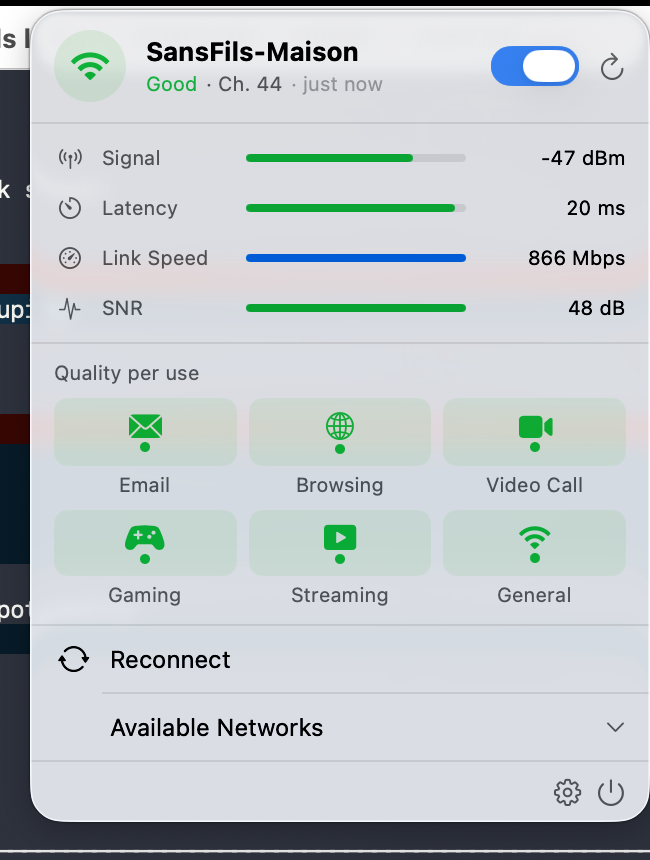
WifiManager menu bar popover showing live signal metrics and per-use quality scores

featuresfonctions功能

More than a signal barPlus qu'une barre de signal不只是一格訊號

CoreWLAN under the hood, a clean SwiftUI popover on top. Everything you need to understand — and fix — a flaky connection.CoreWLAN sous le capot, un popover SwiftUI net au-dessus. Tout pour comprendre — et réparer — une connexion capricieuse.底層是 CoreWLAN,上層是簡潔的 SwiftUI 彈出視窗。理解並修好一條不穩定連線所需的一切。
📊

Live signal metricsMesures de signal en direct即時訊號指標

RSSI, latency, link speed and SNR with animated bars, updated event-driven via CoreWLAN.RSSI, latence, débit du lien et SNR en barres animées, mis à jour par événements via CoreWLAN.RSSI、延遲、連線速率與 SNR,以動態長條呈現,透過 CoreWLAN 事件驅動更新。

📱

Hotspot detectionDétection de partage de connexion熱點偵測

Spots an iPhone Personal Hotspot automatically via NWPathMonitor — and skips the speed test to save your data.Repère automatiquement un partage de connexion iPhone via NWPathMonitor — et saute le test de débit pour épargner votre forfait.透過 NWPathMonitor 自動辨識 iPhone 個人熱點——並跳過速度測試以節省你的行動數據。

Download speed testTest de débit descendant下載速度測試

Optional real throughput measurement when you want the full picture.Mesure de débit réel optionnelle, quand vous voulez l'image complète.需要完整資訊時,可選擇進行實際吞吐量量測。

🔎

Network scannerScanner de réseaux網路掃描

Lists nearby networks grouped by SSID with an AP-count badge; join directly with a password prompt.Liste les réseaux proches groupés par SSID avec un badge du nombre de bornes ; rejoignez directement avec une demande de mot de passe.列出附近的網路並依 SSID 分組,附上 AP 數量標籤;可直接連線並輸入密碼。

📍

Location auto-switchBascule automatique par lieu依地點自動切換

Capture a location and auto-switch to its preferred SSID on arrival — opt-in, via CoreLocation.Enregistrez un lieu et basculez automatiquement sur son SSID préféré à l'arrivée — sur activation, via CoreLocation.記錄一個地點,抵達時自動切換到該地點偏好的 SSID——需自行啟用,透過 CoreLocation。

🔄

Auto-reconnectReconnexion automatique自動重連

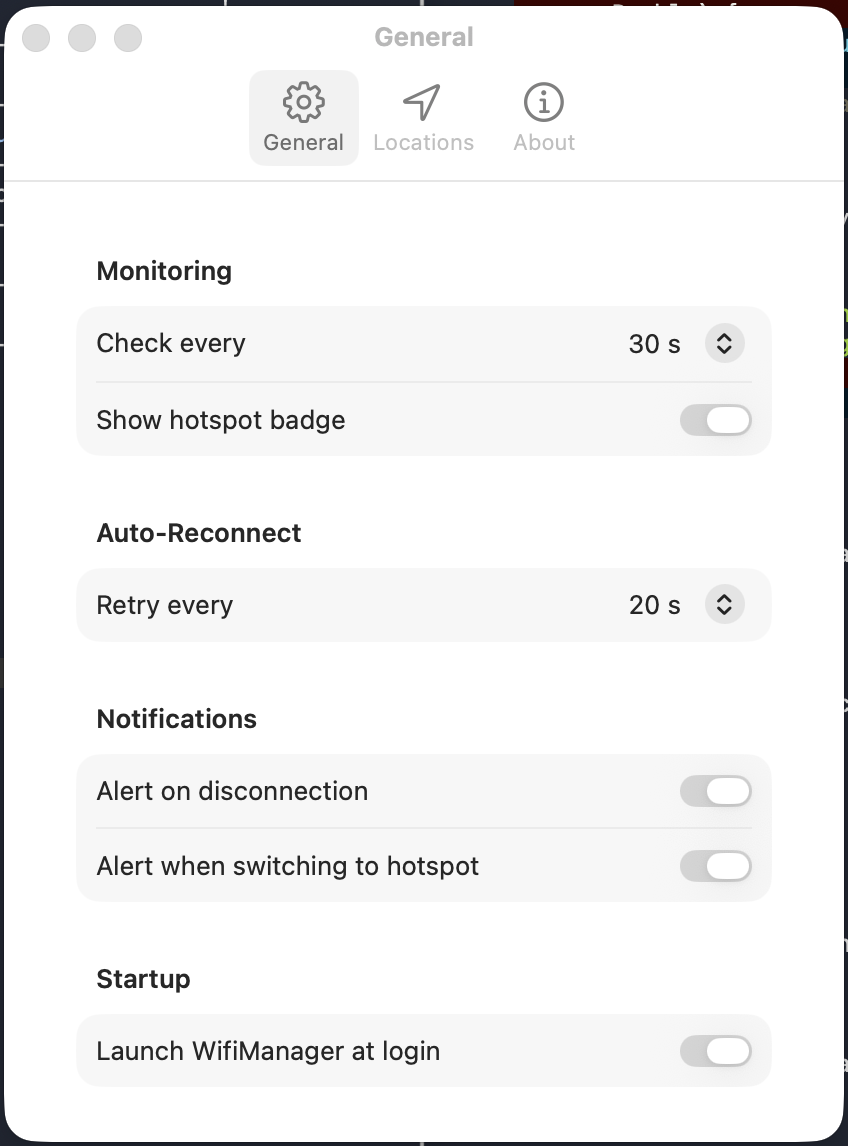
Retries the connection when dropped, at a configurable interval. Toggle WiFi from the popover.Retente la connexion en cas de coupure, à un intervalle configurable. Activez ou coupez le WiFi depuis le popover.斷線時會依可設定的間隔重試連線。也可從彈出視窗直接開關 WiFi。

🔔

Smart notificationsNotifications intelligentes智慧通知

Optional alerts on connection loss and when you switch onto a hotspot — never silent.Alertes optionnelles en cas de perte de connexion et lors du passage sur un partage de connexion — jamais silencieux.可選擇在斷線以及切換到熱點時發出提醒——不會默不作聲。

🚀

Launch at login & auto-updateLancement à la session et mise à jour auto開機啟動與自動更新

SMAppService start-up plus Sparkle 2 update prompts — you're always in control.Démarrage via SMAppService et propositions de mise à jour Sparkle 2 — vous gardez la main.SMAppService 啟動,並由 Sparkle 2 詢問更新——主導權始終在你手上。

🟢

Color-coded iconIcône codée par couleur彩色狀態圖示

Green / orange / red menu bar icon with a searching-pulse animation. Hide the native macOS WiFi icon and use this instead.Icône verte / orange / rouge en barre de menus, avec une pulsation pendant la recherche. Masquez l'icône WiFi native de macOS et utilisez celle-ci.綠/橙/紅三色的選單列圖示,搜尋時會有脈動動畫。你可以隱藏 macOS 原生的 WiFi 圖示,改用這一個。

per-use scoringnotation par usage依用途評分

Is it good enough for this?Est-ce assez bon pour ça ?這條連線撐得住這件事嗎?

The same connection can be perfect for email and useless for a video call. WifiManager rates your link for each use case, so you know before it fails.La même connexion peut être parfaite pour le mail et inutilisable pour un appel vidéo. WifiManager note votre lien pour chaque usage, pour que vous le sachiez avant que ça lâche.同一條連線可能收信完美、視訊卻完全不能用。WifiManager 會針對每種用途為你的連線評分,讓你在它出問題之前就知道。

✉️
EmailE-mail電子郵件
🌐
BrowsingNavigation瀏覽網頁
🎥
Video callAppel vidéo視訊通話
🎮
GamingJeu遊戲
📺
StreamingStreaming串流

a look insideun aperçu內部一覽

Simple on the surfaceSimple en surface表面單純

A glanceable popover and a focused Preferences window — bilingual, accessible, and out of your way.Un popover lisible d'un coup d'œil et une fenêtre de préférences resserrée — bilingue, accessible, et discrète.一眼可讀的彈出視窗,加上一個聚焦的偏好設定視窗——雙語、易於存取,而且不擋路。

get starteddémarrer開始使用

Up and running in 30 secondsOpérationnel en 30 secondes30 秒內開始使用

Notarized by Apple — it launches by double-click, no configuration needed.Notariée par Apple — elle se lance d'un double-clic, sans configuration.已通過 Apple 公證——按兩下即可啟動,不需任何設定。

DownloadTélécharger下載

Grab the latest signed .dmg from GitHub Releases and open it.Récupérez le dernier .dmg signé depuis GitHub Releases et ouvrez-le.從 GitHub Releases 取得最新的已簽章 .dmg 並開啟。

InstallInstaller安裝

Drag WifiManager.app into /Applications.Glissez WifiManager.app dans /Applications.WifiManager.app 拖入 /Applications

LaunchLancer啟動

Open it — the color-coded icon appears in your menu bar. That's it.Ouvrez-la — l'icône colorée apparaît dans la barre de menus. C'est tout.開啟它——彩色圖示就會出現在選單列。就這樣。

ready?prêt ?準備好了嗎?

Take control of your WiFiReprenez la main sur votre WiFi把 WiFi 的主導權拿回來

Free, open-source, bilingual and auto-updating. macOS 14 Sonoma or later.Gratuite, open source, bilingue et auto-mise à jour. macOS 14 Sonoma ou ultérieur.免費、開源、雙語介面並可自動更新。macOS 14 Sonoma 或以上版本。